OV
Personal overview
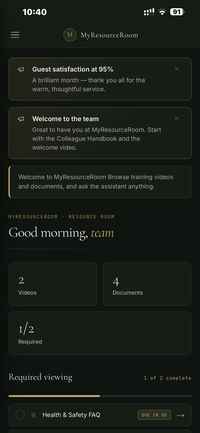
Give each person a clear home for announcements, required learning, documents and the next actions that matter to them.
My Resource Room is not just a mobile app. It is a complete web and mobile platform for employees, managers and administrators — covering knowledge, learning, communication, compliance and insight.
Employees can use Resource Room on mobile or desktop to learn, find documents, ask questions, receive updates, message colleagues and complete required actions.
Give each person a clear home for announcements, required learning, documents and the next actions that matter to them.
Publish team updates and notices in one place, with reactions that help communication feel more immediate and visible.
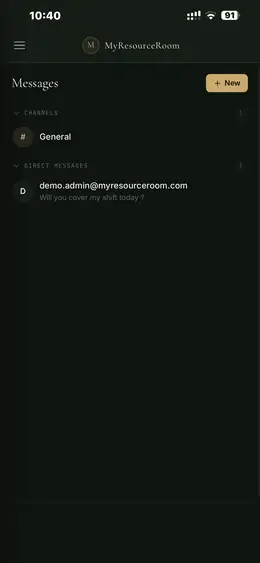
Use channels and direct messages so people can ask questions, coordinate work and stay connected without leaving Resource Room.
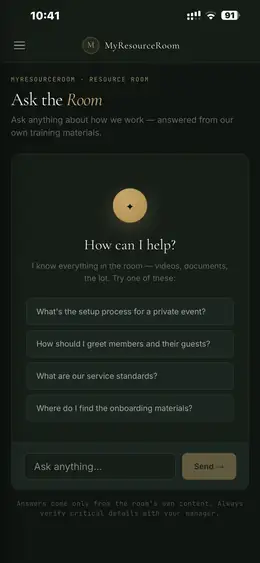
Let people ask natural-language questions and receive answers grounded in your organisation’s own approved knowledge.
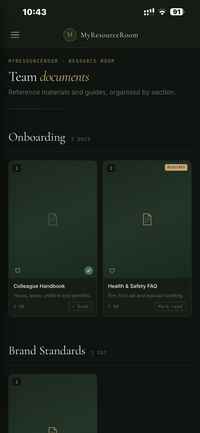
Organise training videos by section, mark required content and make progress easy for users to understand.
Keep handbooks, policies, FAQs and reference documents together, with required reading and completion status.
Guide people through structured learning journeys instead of leaving them to work out what to consume next.
Let users save the resources they return to most, reducing friction for frequently used knowledge.
Record when people confirm they have read and understood important information, with a timestamped audit trail.
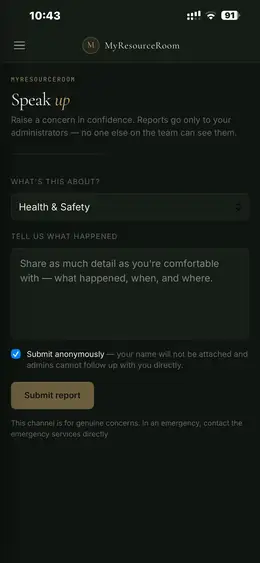
Provide a confidential route for genuine concerns, including the option to submit anonymously.
The mobile experience is ideal for front-line teams, but the platform also works fully in the browser. That matters for managers, office-based teams and administrators who need more space to manage content, people and reporting.
The desktop admin experience gives managers more than a content uploader. It provides operational visibility across learning, usage, people and compliance.
See total views, active members, completions, overdue activity and top content so you know what is being used.
Track required training, certificates and attestations across your team, including overdue, expiring and not-started activity.
Export compliance activity to CSV when you need a clear record for review, reporting or audit.
Shape features and content around organisations, teams, roles and individual users.
Upload, organise and maintain videos, documents and approved website sources from the desktop admin experience.
Assign important content, set due dates and monitor completion from one place.
Users can work through videos and documents by section, see what is required, track completion and return to material whenever they need it.
Employees ask a question in natural language and receive an answer based on the videos, documents and approved web content inside their Resource Room.
Team feeds, channels and direct messages let organisations communicate without separating learning, knowledge and everyday updates into different systems.
Users can select a concern type, share what happened and choose to submit anonymously, with reports routed only to authorised administrators.
We’ll show you how Resource Room works across mobile and desktop, then focus the demo on the training, knowledge, communication or compliance problem you want to solve.